




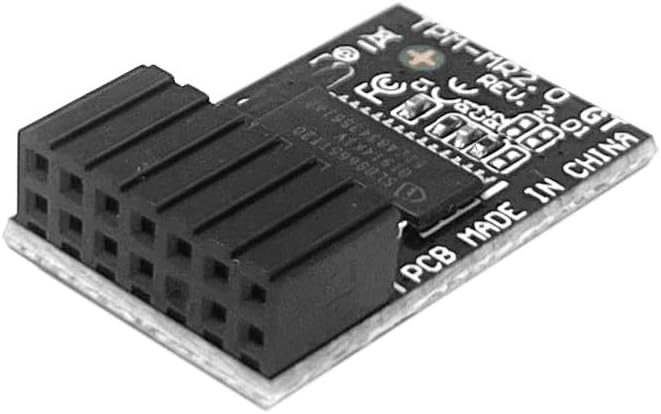
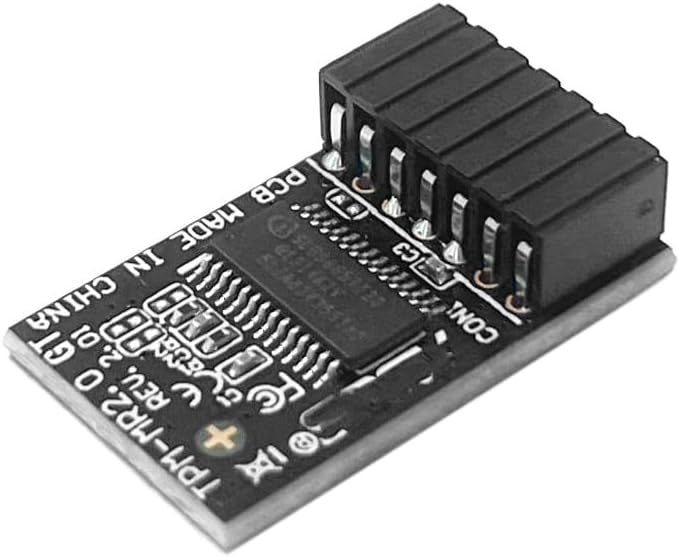
Security Module TPM 2.0 Module LPC 14Pin Module SLB9665 for ASUS ROG Strix B250I H270I Z270G Gaming/ROG Strix B250H Gaming/ROG Strix Z270-I Gaming/ROG Strix Z270H Gaming/ROG Strix Z270F Gaming

 4.1 (18 items)
 Limited Time Sale
US$13.13 cheaper than the new price!!
Free cash-on-delivery fees for purchases over $99
Product details
| Management number | 217023362 | Release Date | 2026/04/19 | List Price | US$8.75 | Model Number | 217023362 | ||
|---|---|---|---|---|---|---|---|---|---|
| Category | |||||||||
TPM2.0 Module LPC 14Pin Module with Infineon SLB9665 for ASUS Motherboard Compatible with TPM-M R2.0 Important Notes: 1. This product is only compatible with older motherboards such as Intel and AMD. It is not compatible with newer motherboard models featuring firmware TPM, all-in-one PCs, or laptops. 2. The minimum hardware requirements for upgrading to Windows 11 via TPM 2.0 are as follows: a 1 GHz or faster 64-bit processor (dual-core/multi-core), 4 GB of memory, 64 GB of storage space, firmware supporting UEFI Secure Boot and TPM 2.0, a DirectX 12-compatible graphics card, and a display with a resolution of 720p or higher. 3. This product has a 14pin-1 connector. Please carefully check the pin positions in the image to ensure compatibility with your motherboard before purchasing. Compatible with ASUS Motherboard TPM-SPI Trusted Platform Module ROG STRIX B250I GAMING ROG STRIX B250H GAMING ROG STRIX Z270-I GAMING ROG STRIX Z270H GAMING ROG STRIX Z270F GAMING ROG STRIX Z270G GAMING ROG STRIX H270I GAMING ROG STRIX Z270E GAMING TUF Z270 MARK 1 TUF Z270 MARK 2 Compatible with TPM-M R2.0(14pin-1 ) Chipset: Infineon SLB9665 PIN DEFINE:14Pin Interface:LPC How to select and install a security module: 1. Confirm whether the host has TPM 2.0 or if TPM 2.0 is enabled. 2. Click “Run,” enter: tpm.msc (Win+R keys), and check if the TPM version is ready. 3. If version 2.0 is displayed but not ready, you need to configure settings in the BIOS; consult the motherboard manufacturer's customer service. 4. Open the host and inspect the TPM pins on the motherboard. 5. When installing the module, ensure the chip-side faces inward, align with the pins, and insert fully to prevent loosening. (See image for direction) Core Applications: 1: Seamless upgrade to Windows 11: Resolve TPM 2.0 verification issues and easily upgrade to the latest operating system. 2: Enhanced hardware-level security: Provides an independent secure encryption chip specifically designed for securely storing sensitive data (such as encryption keys, digital certificates, and login credentials), thereby enhancing overall system security. 3: Hardware encryption acceleration: Reduces CPU load by accelerating encryption operations via dedicated hardware, indirectly improving system response speed and enhancing the smooth operation of certain encryption-dependent applications (such as games and security software).
- TPM 2.0 TPM-M R2.0 (14pin-1)Module TPM LPC 14Pin Module ,TPM LPC Trusted Platform Module for ASUS ROG STRIX B250I B250H Z270-I Z270H Z270H Z270F Z270G H270I Z270E GAMING,TUF Z270 MARK 1/ MARK 2 Compute Securely Bus Header Key
- Important: The minimum hardware requirements for upgrading to Windows 11 via TPM 2.0 are as follows: 1 GHz or faster 64-bit processor (dual-core/multi-core), 4 GB of memory, 64 GB of storage space, firmware that supports UEFI Secure Boot and TPM 2.0, DirectX 12-compatible graphics card, and a display with a resolution of 720p or higher.
- Purpose a: Resolve the TPM 2.0 verification issue when upgrading to Windows 11, enabling it to function as an independent encryption chip, providing secure storage for sensitive data, and enhancing security;
- Use case b: Hardware encryption acceleration, such as improving game lag issues and other functions.
- Easy Installation: The installation process is extremely straightforward. Simply locate the 14-pin connector labeled “TPM” or “LPC ” on your for ASUS ROG STRIX motherboard while the system is completely powered off. Align the module correctly and insert it into the socket. No additional drivers are required. After enabling the TPM feature in the motherboard BIOS, the operating system will automatically recognize the module, delivering a true plug-and-play experience.
| Brand | IFIXAI |
|---|---|
| Manufacturer | IFIXAI |
| Processor Brand | Intel or AMD |
| Processor Count | 1 |
| Processor Speed | 1 GHz |
| Operating System | Windows 11 |
| Compatible Devices | ASUS ROG STRIX B250I GAMING, ASUS ROG STRIX B250H GAMING, ASUS ROG STRIX Z270-I GAMING, ASUS ROG STRIX Z270H GAMING, ASUS ROG STRIX Z270F GAMING, ASUS ROG STRIX Z270G GAMING, ASUS ROG STRIX H270I GAMING |
| RAM Memory Technology | DDR4 |
| Connectivity Technology | LPC |
| Memory Storage Capacity | 64 GB |
Bestseller ranking
Laptop Replacement Parts


Customers who viewed this product also viewed
Bridge & Bridge Parts


Correction of product information
If you notice any omissions or errors in the product information on this page, please use the correction request form below.
Correction Request Form